
Skip to content

The product

Everything your team needs to serve customers on WhatsApp

Shared inbox, campaigns, calls, pipeline, scheduling, catalog, AI flows and forms, in a single panel and built on Meta's WhatsApp Business Platform.

Shared inbox
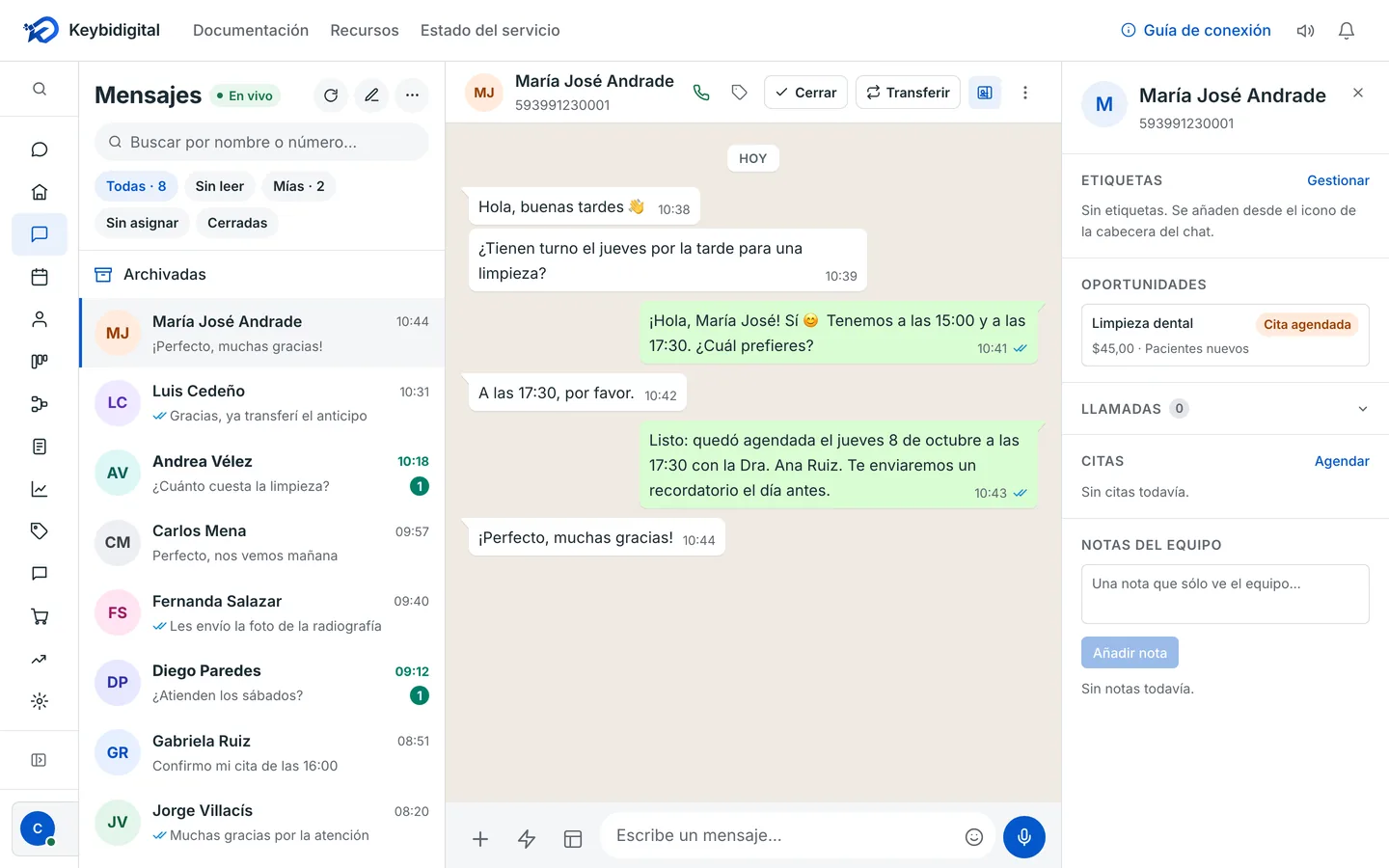
Every conversation on your number in one place, each with its owner.

  • Automatic assignment to whoever is online, or by hand.
  • Transfers between people without losing the thread.
  • Internal notes your customer never sees.
  • Labels, keyboard shortcuts and quick replies.
They come from an ad, the AI answers and books, and the team leaves a note.

Teams and permissions

Everyone sees and does what's theirs.

  • Roles that fit you: agent, supervisor or whatever you define.
  • Each person's presence decides who gets new work.
  • A cap on how many conversations each person handles at once.
  • Your full history, with no month limit.

Ortega & Asociados

Law firm · Quito

  1. Carlos: Good afternoon, I need advice about a lease agreement.3:20 PMRead
  2. Ortega & Asociados (Written by the AI): Happy to help, Carlos. So I can pass you to the right attorney: are you the landlord or the tenant?3:20 PM

    Reply options: Landlord, Tenant. Chose “Tenant”

  3. Carlos: Tenant3:21 PMRead
  4. Ortega & Asociados (Written by the AI): Thanks. Would you prefer to meet at the office or by video call?3:21 PM

    Reply options: At the office, Video call. Chose “Video call”

  5. Carlos: Video call3:21 PMRead
  6. Ortega & Asociados: Hi Carlos, I'm Lucía. How about Tuesday at 10:00 AM by video call? Does that work for you?3:34 PM
  7. Carlos: Perfect, Tuesday at 10:00 AM.3:36 PMRead

Internal note · AI agent

Tenant · prefers a video call. The AI didn't ask about the case: he'll explain it at the meeting.

Only your team sees it

TUE

Advice · lease agreement

Tuesday · 10:00–10:45 AM

Lucía Ortega, attorney · Carlos Mendoza

Video call

Handed to an attorney, step 2 of 3

Template campaigns

Messages to many customers at once, with the templates Meta approves.

  • Marketing, utility and authentication templates.
  • Sends scheduled for the time you choose.
  • What happened to each message: delivered, read or failed.
  • Quick reply buttons that lead into your flows.
The results of a WhatsApp campaign sent to 1,248 patients: delivered, read, replied and failed —and why, with the reason Meta gave—, what it cost and the cost of each reply, and which buttons they tapped.

Click to WhatsApp ads

You know which ad brought in each customer.

  • The ad's card shows up inside the conversation.
  • Every deal in the pipeline keeps the ad it came from.
  • If you turn it on, we tell Meta about the sales that come out of the chat so your ads learn.
  • Your flows can answer differently when someone comes from an ad.

Muebles Roble

Sponsored

Made to your measurements and ready in 3 weeks. Message us for a quote.

Custom living room set

Custom furniture · Ambato

Send message

Conversion

Purchase Purchase

Value1,250 USD

From the ad “Custom living room set”

10:05 AMReceived by Meta

WhatsApp calls

WhatsApp voice calls, from the panel.

  • Your team answers, and also calls whoever gave permission.
  • Every call stays in its conversation.
  • Recording if you turn it on, kept for as many days as you choose.
  • No separate phones or switchboards.

Sales pipeline

Every deal is born from a conversation and moves through your stages.

  • Stages that fit you, with each one's total.
  • “Move to…” in one click, from your phone too.
  • The customer's history and an AI summary of the conversation, on their card.
  • Which ad they came from, with its thumbnail.

Scheduling and bookings

Your team's appointments, and a page where your customers book on their own.

  • People, rooms and equipment: the calendar crosses everyone's availability.
  • Your booking page, with your services and your rules.
  • Automatic confirmations and reminders on WhatsApp.
  • Video call appointments, in rooms of your own.

Flows and AI agents

Automate the repetitive without losing the personal touch.

  • A visual editor: messages, buttons, questions, conditions and waits.
  • An AI agent that talks with the customer until it meets the goal you set, using what your business knows.
  • Steps that classify intent, extract data, summarize, or answer only with what you teach them: if they don't know, they don't make it up.
  • “Test” before turning it on, the bot per number, and hand-off to a person with a heads-up.

Forms and results

What each customer answers is saved and measured.

  • Native WhatsApp forms, buttons and lists.
  • Every answer in a table, with filters.
  • Exports to CSV or Excel.
  • Outside the chat: a section to measure, not to dig through messages.

Contacts and metrics

Your customer base, organized, and how your number is doing.

  • Labels to segment, and your base exportable to CSV.
  • Trash: anything deleted can be restored for 30 days.
  • Messages, deliveries and reads.
  • Open, pending and closed conversations.

API or coexistence?

There are two ways to connect your number to the WhatsApp Business Platform. Answer three questions and we'll tell you which one fits.

Three questions

Is your number already on the WhatsApp Business app?
Do you want to keep answering from that app on your phone too?
Will you send large campaigns (more than 20 messages per second)?

Answer the three questions to see the recommendation.

What you gain and what you give up

Comparison between connecting your number through the API and through coexistence
WhatAPICoexistence
The WhatsApp Business app on your phoneStops being used with that numberKeeps working, alongside the panel
Your historyYou start from scratchYour contacts and up to 6 months of one-to-one chats come over (files only from the last 2 weeks)
Sending speed80 messages per second, more if Meta raises it20 messages per second, fixed
If you don't use the phoneDoesn't matterThe connection drops after about 14 days without using the app on the phone
What gets turned off in the app—Disappearing messages, view once messages, live location and broadcast lists (existing ones become read-only)
Other linked devices—They keep working, except WhatsApp for Windows and Wear OS
What Meta chargesIts ratesWhat you send from the app, free; what goes out through the panel, its rates

Source: Meta's documentation on coexistence, updated June 26, 2026 and read on September 29. Meta's documentation (opens in a new tab)

Start today, on your own or with us

Create your account and connect your number yourself, or book a video call and we'll connect it together.

Or message us on WhatsApp at +593 99 556 0039 (opens in a new tab)

Message us on WhatsApp (opens in a new tab)